
Contact us
Everything to get going in New Zealand: what to upload, how deposits work, how to install the app and where to find support.
01ID check step by step
Open your profile and tap Verification. There are three upload fields: identity, address and payment. Upload a clear photo or scan for each.
The casino reviews uploads and withdrawal requests. It may ask for more details, and you can send those to support whenever you like. The same name on every document speeds things up.
02What to upload
Identity
A passport, ID card, driver licence or another official document in their place.
Address
A utility bill, phone bill or bank statement showing your full name and address.
Payment
A screenshot or photo from online banking, a statement or your Skrill page that shows the deposit.
JPG, PNG or PDF, up to 10 MB per file.
03Deposits
Tap Deposit to open the cashier. The methods open to you are listed with their minimums. In our check these included crypto (BTC from 0.00035, LTC from 0.5, USDT from 20), MiFinity and open banking from the equivalent of NZ$35.
Enter your bonus code before you pay if you want a bonus. After the payment it's too late to add one.
04Withdrawals
Choose the Withdraw tab in the cashier, then a method and an amount. Wagering on any active bonus has to be finished first. Every winnings request is checked before it's paid, and the casino may ask you to confirm your identity and payment details.
Bonus winnings are capped under the promo guide, so read the caps for the offer you used.
05Install the app
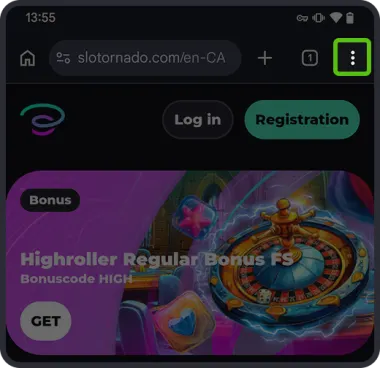
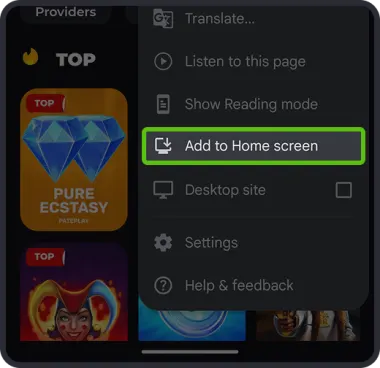
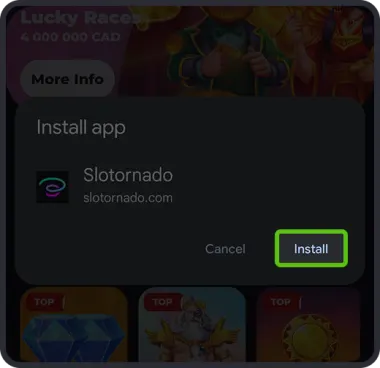
Slotornado is a web app, so there's nothing to download from a store. Follow the steps below for your phone.
Android
 1
1Open the site in Chrome and tap the three-dot menu.
 2
2Select "Add to Home screen".
 3
3Tap "Install".
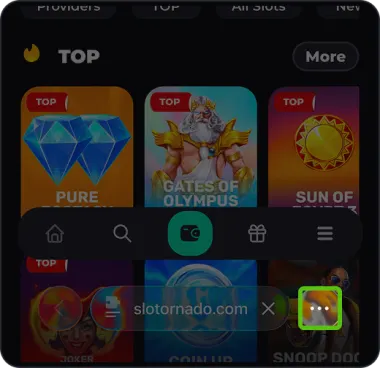
iPhone (iOS)
 1
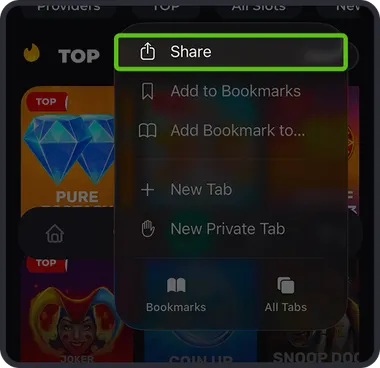
1Open the site in Safari and tap the three dots in the address bar.
 2
2Tap Share.
 3
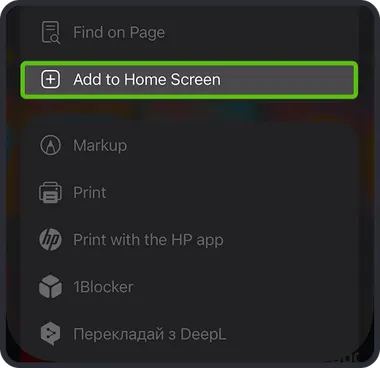
3Find "Add to Home Screen".
 4
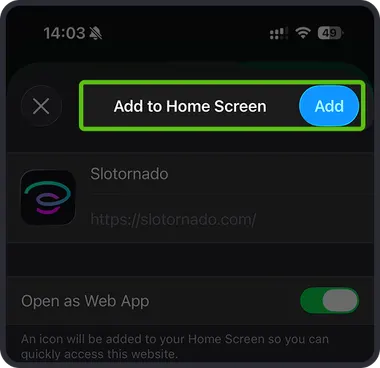
4Tap Add in the top right.
06Reach support
Live chat is in the corner of every casino page. You can also write to support@slotornado.com. Include your player ID and a short description, and attach screenshots when they help.